
If I had to boil this down to one point, it’s this: peptide clinic records need one linked system, not a stack of separate forms. When charts miss support for billing or coding, the risk is not small - one HHS OIG audit found 56% of outpatient claims had procedure codes not backed by the medical record. And the article points to two more pressure points: 35% of claim denials come from weak documentation, while malpractice cases tied to documentation issues end with payment 56% of the time, with an average payout of $432,000.
So if I’m checking peptide records, I’d want all 10 tools working together across the full chart trail:
- Clinical documentation resources to set the chart fields
- Encounter audit checklist to review each visit note
- Consent tracking register to track versions, renewals, and addenda
- MAR audit sheet to confirm dose, route, time, and site
- Lot and batch traceability log to connect product to patient
- Follow-up tracker to keep labs and reassessments on time
- Retention and destruction log to track archive and disposal dates
- Staff review workflow tracker to assign chart checks and fixes
- HIPAA documentation toolkit to store privacy and security records
- AI EMR audit rules to stop missing fields before chart close
The article’s core message is simple: every record should show the clinical rationale for peptide therapy, what product was ordered, where it came from, what the patient agreed to, what follow-up happened, and how the file was kept and protected. In practice, that means seven main record areas: medical need, complete orders, informed consent, product traceability, follow-up, privacy controls, and record retention.
Quick Comparison
| Tool | Main job | Main risk it helps prevent | Best format |
|---|---|---|---|
| PeptidePrescriber Clinical Documentation Resources | Set standard chart fields and prompts | Inconsistent charting | EMR template |
| Peptide Encounter Chart Audit Checklist | Review each encounter note | Missing clinical support or disclosures | Spreadsheet / EMR |
| Peptide Therapy Consent Tracking Register | Track signed consent status and versions | Expired or missing consent | Spreadsheet / EMR |
| MAR Audit Sheet | Review each administration record | Dose, route, or timing gaps | EMR MAR / paper |
| Lot Number and Batch Traceability Log | Track source lots to patients | Recall and traceability failures | Spreadsheet |
| Follow-Up and Monitoring Prompt Tracker | Track labs, reassessments, and missed follow-up | Refills without review | EMR workflow |
| Document Retention and Secure Destruction Log | Track retention periods and destruction | Early destruction or weak disposal records | Spreadsheet / digital log |
| Staff Documentation Review Workflow Tracker | Assign reviews and corrective action | Repeat charting errors | Spreadsheet / EMR |
| HIPAA Compliance Documentation Toolkit | Store privacy and security proof | Missing HIPAA records in review | Digital file |
| AI-Enabled EMR Documentation Audit Rules | Trigger live alerts and hard stops | Missing fields before chart close | EMR workflow |
My quick takeaway: the strongest setup starts before the audit. It uses fixed fields, shared IDs, consent version control, lot matching, timed follow-up prompts, and chart-close rules so gaps are found during care, not months later.
sbb-itb-7164bd9
What to Look for in a Peptide Clinic Audit Tool
Generic medication checklists usually fall short here. They often skip peptide-specific sourcing, off-label disclosure, and lab monitoring. So when you compare the tools below, use a tighter set of criteria.
Peptide-specific fields are non-negotiable. The tool should record the peptide name, formulation concentration, route (subcutaneous or intramuscular), dosing schedule, cycle length, indication and clinical rationale, prescriber credentials and NPI, and the source pharmacy or compounder, including whether it is 503A or 503B. It should also require lot or batch numbers, expiration dates, and beyond-use dates for traceability. On top of that, it needs space for baseline and follow-up labs, plus patient risk factors and contraindications.
It also needs to match U.S. regulatory and recordkeeping standards. In plain terms, that means HIPAA documentation, access-control prompts, informed consent that covers off-label and compounded status, and dates in MM/DD/YYYY format. For billing, the tool should make it easy to connect the clinical indication, the peptide ordered, and any diagnosis codes used.
Speed of retrieval matters more than many clinics think - at least until an audit lands. A good tool should let you filter by patient, peptide name, lot number, consent version, or date range, then export records fast.
The best audit tools do more than help with a look-back review. They work as a point-of-care safeguard. Look for prompts that flag missing prescriber signatures, blank lot fields, lot-specific certificate of analysis (COA) review, and overdue monitoring labs - for example, IGF-1 checks for GH-related peptides or HbA1c for metabolic peptides. If a tool shows those gaps during care, not weeks later, it does a much better job of cutting risk.
Next, use a documentation resource that standardizes those fields before chart review begins.
1. PeptidePrescriber Clinical Documentation Resources
Use these resources to turn the audit criteria above into a chart template your team can use the same way every time.
Peptide-specific documentation coverage
PeptidePrescriber works well as a reference point when you're building a peptide documentation template. The simplest move is to mirror each monograph inside the template and include required fields for indication, dose, route, frequency, contraindication screening, and follow-up.
That gives you a clean format for charting clinical rationale, off-label use, source selection, and follow-up planning. And once that format is in place, it carries straight into the encounter sheet and consent tracker used later.
Audit trail and retrieval strength
Use the calculator and injection guides to turn dose math and administration steps into searchable EMR fields. In practice, that means mapping those inputs to fields for product, lot, site, and preparation method.
This makes the record much easier to search later. If someone needs to trace what was given, how it was prepared, or where it was administered, the key details are already built into the chart instead of buried in free-text notes.
U.S. compliance support
Use the regulatory references to document whether use is on-label, off-label, compounded, or investigational, and link each status to signed consent. If the treatment plan changes, or if a source switch calls for a new review, use core consent plus addenda so the note and consent stay aligned the whole way through.
Monitoring and corrective-action prompts
Build fixed follow-up intervals into the chart and require a documented response to abnormal findings before treatment continues. That shifts the process away from open-ended refills and toward a structured review cycle with a clear corrective-action trail.
Once the template is set, the next step is reviewing each encounter against it.
2. Peptide Encounter Chart Audit Checklist
With the template set up, use this checklist to review each encounter note. At every visit, it should confirm the patient’s eligibility and indication, referencing peptides by therapeutic category, a measurable treatment endpoint, baseline labs that fit the case, the peptide name and formulation or salt form, the dose and titration plan, the route, and the product status: FDA-approved, off-label, compounded (503A or 503B), or investigational.
It should also confirm the benefit-risk discussion, peptide-specific informed consent, patient education, the monitoring plan, and any adverse events or dose changes. The goal is simple: a reviewer should be able to see what was given, why it was given, how it will be tracked, and what changed over time.
Peptide-specific documentation coverage
A generic waiver does not count as informed consent. The consent packet should cover every required domain.
Each checklist item should tie straight to a required chart field. That way, a reviewer can confirm coverage fast, without digging through the full note line by line. If the chart says consent was done, the packet should show it clearly and in the right place.
Audit trail and retrieval strength
Each encounter note should be dated, signed, and free of unlabeled edits or missing pages. The audit form should also record:
- reviewer name and role
- date of the audit
- audit type
- issues found
- corrective actions started
The checklist should also confirm that the peptide product details, lot number, and pharmacy or manufacturer information match the separate lot log and any lot-specific COA. If those records don’t line up, that’s a red flag. Use structured EMR fields and standard tags to make retrieval faster and far less messy.
U.S. compliance support
For U.S. clinics, the checklist should confirm that the chart note and the consent packet use the same wording for the product name and status. Small wording gaps can turn into big review problems later.
It should also flag whether consent is current, especially after a product source change, a new indication, or a higher-risk regimen. The note should clearly document medical need, any off-label or compounded status, and coverage or cost discussions.
Monitoring and corrective-action prompts
Each checklist item should include a follow-up action when something is missing. In plain terms, the form shouldn’t just spot the gap. It should tell staff what to do next.
If baseline IGF-1 levels are missing for a growth hormone-axis peptide, order labs before therapy continues. If the 1- to 2-week tolerability check is missing, complete a retrospective safety call and add a note to the chart. The checklist should also require a documented reassessment at 8–12 weeks so any decision to continue, change the dose, or stop treatment is tied to recorded response.
Charts should receive a low-, medium-, or high-risk rating so repeat gaps can be tracked and checked again. Any unresolved gaps should be routed into the consent tracker and lot log.
3. Peptide Therapy Consent Tracking Register
Use the encounter checklist to spot consent gaps. Use this register to fix them.
A consent tracking register is a central log that shows the informed consent status of every patient receiving peptide therapy. Each entry should tie straight to the peptide prescribed, the product status, and the exact version of the consent packet the patient signed. That level of detail helps during an audit.
Each entry should also include version control and addenda tracking. In plain terms, you want a clear record of which addenda were signed, such as a GLP-1 addendum, an off-label use disclosure, or a compounded medication disclosure (503A or 503B).
Keep the register tight. It should show consent status at a glance.
| Data Field Category | What to Record |
|---|---|
| Consent Metadata | Date signed, form version number, expiration or renewal date |
| Addenda Tracking | GLP-1, off-label, and compounded medication disclosures |
| Regulatory Status | 503A, 503B, or FDA-approved |
| Sourcing Details | Pharmacy name, source reference, lot-specific COA verification |
| Financial Disclosure | Any prescriber financial interest in the pharmacy |
Every entry should be timestamped and linked to the source consent file. If a patient moves to a higher-dose regimen, the register should show two separate entries: the original consent and the updated one, plus a short note on what changed.
If FDA status changes, filter the affected patients and send them through re-consent. Flag consents older than 12 months. Re-consent after source, indication, or dose changes. When you find a gap, log the corrective action right in the register, including:
- The date the patient was notified
- The date new consent was signed
- A note that the previous consent was archived
Once consent is current, verify actual administration in the MAR.
4. Medication Administration Record Audit Sheet
Carry the signed consent version from the register into the MAR review. Once consent is current, use the MAR audit sheet to confirm the right patient, dose, route, and time.
Peptide-Specific Documentation Coverage
A standard MAR often misses details that matter for peptides. This audit sheet should fill those gaps. Along with the basics - patient name, date of birth, medical record number, prescriber, and administering staff credentials - it should capture the exact formulation and concentration, the exact dose and units, route, injection site, and the date and exact time of administration.
It should also prompt reviewers to check the titration stage, baseline and follow-up labs when needed, injection site rotation tracking, and any adverse events or patient response tied to the dose. In plain terms: not just what was given, but how it was given and what happened next.
The sheet should also record source status and the pharmacy reference. Each entry needs to link back to the lot number and source record.
| MAR Audit Field Category | Specific Data Points to Verify |
|---|---|
| Product Identity | Peptide name, concentration, lot number, beyond-use date (BUD) |
| Sourcing & Regulatory | Pharmacy name, 503A/503B status, product status, lot-specific COA |
| Preparation | Reconstitution date/time, solvent type, staff initials |
| Clinical Execution | Exact dose (mcg/mg), volume (mL), route, injection site |
| Safety Monitoring | Baseline lab date, follow-up lab date, adverse event notes |
| Compliance | Linked consent form version, off-label disclosure, MedWatch filing if applicable |
Once those fields are in place, audit for completeness and timing.
Audit Trail and Retrieval Strength
Every MAR entry should include a unique visit ID or MAR entry ID that matches the related EMR encounter. Use standard field labels and checkboxes so a reviewer can scan the record fast and spot missing items without digging around. Add the review date and time, auditor initials, and storage location too.
That may sound small, but it matters. When records are easy to trace, audits move faster and mistakes are easier to catch.
U.S. Compliance Support
For U.S. clinics, the audit sheet needs to do more than tick boxes. It should confirm that charting time-stamps follow administration, which lines up with CMS medical record expectations.
It should also verify prescriber type and supervision details when required. For billing, fields that connect the administration to a diagnosis code and documented medical necessity can help during payer audits. If an insurer asks, “Why was this given, and under whose order?” the chart should answer that right away.
Monitoring and Corrective-Action Prompts
One of the most useful parts of the sheet is the gap checklist. Instead of a vague review for completeness, it should require a yes/no check for items such as:
- Lot number and expiration date present
- Dose and route match the order
- Injection site documented
- Protocol stage noted
- Relevant labs reviewed per protocol
When gaps show up, document the severity, owner, due date, and resolution status. Then roll those findings into trend data for staff retraining or EMR updates. That shifts the MAR from a static record to a working quality-control tool.
5. Lot Number and Batch Traceability Log
After the MAR, the lot log is what proves traceability. It should show the source lot, expiration date or BUD, dispensing record, and patient chart. Use the same patient, visit, and dose IDs already listed in the MAR so records line up cleanly.
Peptide-Specific Documentation Coverage
A peptide log needs to do more than track stock on a shelf. It should record the peptide name and salt form, concentration, vial size, dosage form, intended route, supplier or pharmacy name, 503A or 503B status, manufacturer lot number, internal batch ID, expiration date or BUD, reconstitution date when needed, and storage requirements.
Every dispensing event should connect back to the patient name or ID, medical record number, prescription number, prescribing clinician, date dispensed or administered, dose amount, and visit ID. For injectable products, the log should also point to a lot-specific Certificate of Analysis that matches the vial.
| Log Category | Required Data Fields |
|---|---|
| Product Identity | Peptide name, salt form, concentration, vial size, dosage form, route |
| Source | Supplier or pharmacy, 503A/503B status, manufacturer lot number, internal batch ID, COA reference # |
| Stability | Expiration date/BUD, reconstitution date, storage |
| Dispensing Link | Patient name/ID, medical record number, prescription number, prescribing clinician, date dispensed or administered, dose amount, visit ID |
| Quality Checks | Purity %, sterility/endotoxin status, mass-spec confirmation |
Audit Trail and Retrieval Strength
If a pharmacy sends out a recall for a certain lot, the clinic should be able to search that lot fast and pull a list of every affected patient, dose, date, and prescriber. That only works if the EMR, inventory file, and dispensing record all use the same IDs. One search should bring up every affected patient without guesswork.
The log also needs a searchable format, whether that's inside an EMR module or a structured spreadsheet with role-based access. Each entry should be time-stamped and show who received, prepared, verified, and dispensed the product. A lot of clinics now use barcode-scanned lot capture for this reason: during a recall or audit, speed matters.
U.S. Compliance Support
State compounding rules often call for patient ID, lot numbers, QC results, and BUD fields. This log should include all four.
HIPAA applies here too. Patient details in the log, including names, MRNs, and contact information, count as protected health information. That means access controls, audit logging, and secure storage are required.
Monitoring and Corrective-Action Prompts
A static list of lot numbers won't do the job. The log should flag stock that is nearing expiration, prompt staff to quarantine and dispose of expired product, and include a recall response field that tracks quarantine date, units on hand, units dispensed, patient notification status, and final outcome.
When something doesn't match - like a missing lot entry, an expiration-date mismatch, or a COA that doesn't match the vial's batch number - the log should require a corrective-action note. That note should state what was found, who looked into it, and how it was resolved. Any lot issue that stays open should move into the follow-up tracker and staff review workflow.
6. Follow-Up and Monitoring Prompt Tracker
Use an EMR-based tracker to log required labs, visits, and monitoring dates, then send prompts before each deadline. If you don't have that system in place, things slip. Labs get missed. Follow-up slows down. Refills keep moving forward without a documented decision.
Each task should link back to the same patient, peptide, and visit IDs used in the consent register, MAR, and lot log. That way, the record stays connected from start to finish.
Peptide-Specific Documentation Coverage
Generic reminders won't cut it. Monitoring schedules change by peptide class, so the tracker needs to match the exact peptide prescribed and its required intervals. Set the full monitoring schedule at initiation, not one visit at a time.
| Monitoring Phase | Timing | Key Fields to Document |
|---|---|---|
| Pre-Initiation | Day 0 | Baseline labs, therapeutic endpoint, signed consent |
| Loading Phase | Weeks 1–4 | Tolerability check-in, injection-site assessment, adverse event log |
| Effect Evaluation | Weeks 8–12 | Repeat safety labs, endpoint re-measurement, continue/adjust/stop decision |
| Maintenance | Every 3 months | Ongoing rationale, adverse event review, pharmacy compliance verification |
Audit Trail and Retrieval Strength
Every action in the tracker needs a timestamp and a user ID. In plain terms, you should be able to see:
- who scheduled the lab
- who reviewed the result
- who notified the patient
- what the next step was
That level of tracking matters. Research shows that 13% of missed diagnoses in ambulatory care involved providers not receiving diagnostic or lab results. A closed-loop tracker helps close that gap.
An auditor should be able to open any peptide patient's file and follow a clean sequence: lab ordered, result received, result reviewed, patient notified, follow-up scheduled. If one step is missing, the tracker should flag it as an open item.
U.S. Compliance Support
Store tracker data with role-based, audit-logged access. MedWatch adverse event reports have a 15-day filing clock, and related monitoring records must be kept for 10 years to stay audit-ready.
Monitoring and Corrective-Action Prompts
The tracker should do more than remind. It should push action when a patient misses a visit or when a result comes back abnormal.
If a lab result falls outside the accepted range for that peptide, prompt a documented clinical response, such as:
- dose reduction
- temporary hold
- repeat labs
- escalation
If a patient can't complete the monitoring plan, pause or decline the prescription and document the reason. After each open item is closed, move the record into retention review and archive controls.
7. Document Retention and Secure Destruction Log
Once the follow-up tracker closes an item, move it into retention and destruction control. This log tracks the creation date, retention period, storage location, and destruction method. It marks the last step in the record trail: active care, then retention, then destruction. In plain terms, it keeps the final audit-trail link in place after consent, MAR, lot, and follow-up records are done.
Peptide-Specific Documentation Coverage
Include encounter notes, consents, orders, pharmacy correspondence, lot records, labs, adverse events, monitoring plans, and discontinuation notes. Use our clinical tools to standardize these records. For each entry, include:
- a document type tag
- a patient or case ID
- a flag showing whether the record belongs to the HIPAA designated record set
Add a legal-hold flag for any product under FDA removal notice or review. That way, records stay untouched until the status is settled.
Audit Trail and Retrieval Strength
This log only works if it records the right details. Each destruction event should include the date, record type, date range, format, retention rule, destruction method, and the staff member and witness who signed off.
Keep PHI out of the log. Use the record type and date range instead of patient names or clinical details. Also, treat the destruction log itself as a permanent record, even after the underlying records have been destroyed.
U.S. Compliance Support
After the log fields are in place, apply state retention rules and HIPAA documentation rules. HIPAA leaves clinical-record retention to state law, while HIPAA policies and destruction logs must be kept for at least 6 years under 45 CFR §164.316.
For electronic destruction, use NIST SP 800-88. If a vendor handles destruction, keep the vendor certificates in the log.
Monitoring and Corrective-Action Prompts
Run a report every 90 to 180 days for records that are getting close to their destruction date. Any record marked high-risk, such as one involving complex peptide regimens, serious adverse events, or active board or payer investigations, should need explicit sign-off from a compliance lead before destruction moves forward.
If an audit finds a gap, like a missing consent addendum or an undocumented destruction event, record the corrective action in the log along with the completion date. Review the log once a year as part of the records inventory audit.
8. Staff Documentation Review Workflow Tracker
After the active-chart tools above, this workflow tracker helps catch documentation gaps before they turn into retention problems. The idea is simple: assign recurring reviews to the right people, log what they find, and send fixes to the right owner while the chart is still active. One rule should be set at the start: reviewers either fix the chart themselves or send it back to the original author.
Here’s a practical role breakdown:
| Role | Documentation Responsibility | Audit Checkpoint |
|---|---|---|
| Medical Assistant / Intake Staff | Verify intake completeness. | Are required intake fields and consent documents present? |
| Nurse / Clinical Staff | Review administration, follow-up, and adverse-effect documentation. | Are dosing, route, lot/batch, and monitoring details complete? |
| Clinician / Prescriber | Confirm assessment and treatment rationale. | Does the note support the indication and plan? |
| Inventory / Pharmacy Coordination Staff | Verify lot/batch, source pharmacy, and compounding status. | Are lot numbers, BUD, and 503A/503B details current? |
| Compliance Officer / Office Manager | Perform final spot checks and trend review. | Are unresolved deficiencies escalated and rechecked? |
Peptide-Specific Documentation Coverage
Once roles are assigned, the tracker should check the exact fields tied to each role. For peptide encounters, staff should verify product identity, source status, consent alignment, and peptide dosing protocols for note consistency. If a patient’s peptide source or therapy changes, the tracker should flag the chart for a new consent review.
Audit Trail and Retrieval Strength
Each review entry should log the date, reviewer name and role, findings, the corrective action assigned, and the date the issue was closed. Version history matters too. The tracker should keep original entries, amendments, and approvers. That gives the clinic a clear quality-control record instead of a last-minute cleanup story.
U.S. Compliance Support
HIPAA-aligned access controls should be built into the tracker from day one. Only the roles assigned to a given review should be able to view the related records, and every review action should be tied to a specific staff member. For peptide practices, the tracker should also prompt staff to confirm the dispensing pharmacy’s current licensing status and check whether any prescribed peptide appears on a current FDA removal notice.
Monitoring and Corrective-Action Prompts
With roles, access, and version control in place, shift to a fixed review cadence. A workable schedule looks like this:
- Monthly random spot checks
- Quarterly high-risk peptide audits
- One annual full-scope mock audit
When a deficiency shows up - like a missing consent addendum, an unsigned note, or an absent lot number - the tracker should require the reviewer to assign an owner, set a due date, and record the resolution. Then schedule a re-audit within 60 to 90 days to confirm the fix held.
Over time, tracking defect categories such as “missing lot number” and “consent version mismatch” makes patterns easier to spot. That’s how a clinic can tell the difference between a one-off charting mistake and a staff training problem that calls for a process change.
9. HIPAA Compliance Documentation Toolkit
A HIPAA compliance documentation toolkit is the clinic’s central HIPAA file. It’s the place you use to prove compliance with the Privacy Rule, Security Rule, and Breach Notification Rule.
That file should hold:
- notices and authorizations
- access logs
- breach and incident reports
- staff training records
- complaint and access-rights records
- business associate agreements
- risk analysis documentation
- sanction logs
Use it as the privacy control layer for the consent, chart, lot, and follow-up records the clinic already keeps.
Healthcare breach volume is still high, so a clear toolkit matters. It helps show what happened, what safeguards were in place, and how the clinic responded.
Peptide-Specific Documentation Coverage
Standard HIPAA templates don’t always match peptide clinic workflows. In a peptide clinic, the toolkit should mark peptide-related clinical data as PHI and sort records tied to pharmacy and lab communications. That includes what PHI was shared, why it was shared, and how the minimum necessary rule was applied.
It should also include sharing authorizations for compounding pharmacies, specialty labs, or external prescribers. If the clinic sends marketing or patient education messages about peptide therapy, keep any separate authorizations required for those communications on file too.
If the clinic uses peptides off-label, or changes a patient’s source or product status in a way that affects risk, the toolkit should prompt a fresh consent review. It should also keep the updated paperwork on file so the privacy records stay in sync with the clinic’s consent and recordkeeping files.
Audit Trail and Retrieval Strength
Each access log entry should record the user ID, role, date and time, patient identifier, record accessed, and purpose. If an auditor asks for proof, staff shouldn’t have to dig through folders for hours. The toolkit should support searchable storage by document type, date, and staff owner so HIPAA records can be pulled fast.
HIPAA-related records are generally kept for at least six years from creation or last effective date, so the toolkit should include a plain retention index and destruction schedule.
U.S. Compliance Support
The toolkit should include a Business Associate Agreement log for vendors that handle PHI, along with effective dates and renewal reminders. It should also prompt staff to check for stricter state privacy laws. That matters in states such as California, Texas, and New York, where extra privacy rules may apply.
Monitoring and Corrective-Action Prompts
The toolkit’s monitoring tools should keep HIPAA documentation current, not just filled out once and forgotten. Set monthly or quarterly reviews for EMR access logs, track repeat HIPAA training completion, and refresh risk analyses on a fixed cycle.
When a breach or privacy incident happens, the workflow should guide staff from the first report through risk assessment, breach-or-non-breach classification, notification decisions, and remediation. Each step needs to be documented. That way, the file tells the full story instead of leaving gaps.
| Toolkit Element | What It Proves | Retention Need |
|---|---|---|
| Notice of Privacy Practices archive | Required privacy notices were issued and acknowledgments retained | 6 years |
| Access request log | Patient access requests and procedures were documented | 6 years |
| Breach file folder | Risk assessment, notification decisions, and follow-up actions were documented | 6 years |
| Training archive | Staff completed HIPAA training with evidence on file | 6 years |
| BAA log | PHI-handling vendors have signed agreements on file | 6 years |
These records work best when EMR rules catch missing fields automatically.
10. AI-Enabled EMR Documentation Audit Rules
After manual checklists and trackers, AI rules turn those same requirements into live chart stops and alerts. Instead of finding gaps later, the EMR can catch missing peptide documentation before chart closure or claim submission. One reported benchmark showed coding accuracy rising from 82% to 96% and denials dropping from 19% to 6%.
Peptide-Specific Documentation Coverage
A well-configured ruleset should require key fields before a chart can close. That includes:
- A specific clinical indication with a measurable endpoint
- Clear product status: FDA-approved on-label, off-label, compounded 503A/503B, or investigational
- Class-specific baseline labs
- A version-controlled consent packet
- A financial-interest disclosure, where needed
- A documented rationale for the peptide prescribed
PeptidePrescriber monographs, dosing protocols, calculators, and injection guides can help define those required fields and the rule logic behind them.
Audit Trail and Retrieval Strength
Every alert, override, and correction should be logged automatically with the user ID, timestamp, and the exact field affected. That gives staff a clean record of how a chart moved from draft status to an audit-ready file.
Audit logs should also support fast retrieval. In plain terms, if someone needs to trace what happened, they should be able to search by user identity, record accessed, action type, and timestamp without digging through a mess of entries.
U.S. Compliance Support
These rules should map to HIPAA Security Rule audit controls under 45 CFR 164.312(b) and CMS medical-necessity requirements. This is the enforcement layer for the HIPAA file and documentation controls described above.
Hard stops make sense for required items such as missing consent, no diagnosis linked to a billed peptide service, or an absent provider signature. Smaller gaps, like a missing injection-site note, are better handled as warnings. That split matters because too many hard stops can wear staff down and lead to alert fatigue.
Monitoring and Corrective-Action Prompts
The best prompts are specific and easy to act on. The system should alert staff when a follow-up lab or reassessment has not been scheduled after starting a higher-risk peptide. It should also flag charts that are missing adverse-event documentation at each follow-up interval and require a "no adverse events reported" confirmation before closure.
Another key check: refills without reassessment. If a prescription is renewed without a documented reassessment of the therapeutic endpoint, the chart should be flagged. Over time, tracking alert resolution rates can show where the rules keep breaking down and where the logic needs tuning.
These rules work best when they match the same required fields already used in consent, MAR, lot, and follow-up records.
| Audit Rule | Hard Stop or Warning | Peptide-Specific Trigger |
|---|---|---|
| Missing product status (FDA-approved on-label, off-label, compounded 503A/503B, or investigational) | Hard stop | Required before any peptide prescription is finalized |
| Absent version-controlled consent packet | Hard stop | Triggered when consent is expired or consent date is missing |
| No baseline labs on file | Hard stop | IGF-1 absent for GH-axis; A1c/lipids absent for GLP-1 agents |
| Missing lot number on injection record | Warning | Flags when administration is documented without batch data |
| No follow-up plan documented | Warning | Triggered at initiation if reassessment date is absent |
| Adverse-event field left blank at follow-up | Hard stop | Requires confirmation entry before chart can be finalized |
Use these rules to standardize review before comparing implementation options.
Side-by-Side Comparison of All 10 Tools
Use this table for a quick side-by-side look at all 10 tools. Start here to narrow down the right fit, then move to the next section to see how they work together in one workflow.
| Tool | Primary Purpose | Key Fields / Functions | Risk Prevented | Best Use Format |
|---|---|---|---|---|
| 1. PeptidePrescriber Clinical Documentation Resources | Provide standardized, evidence-based documentation guidance for peptide therapy | Indication, dosing protocols, monitoring parameters, contraindications, adverse event fields, injection site details | Inconsistent or non–evidence-based chart notes flagged in peer review or board audits | EMR template |
| 2. Peptide Encounter Chart Audit Checklist | Verify that each peptide visit chart includes the required elements | HPI, assessment/plan, diagnosis, peptide indication, product status, consent, lot number, follow-up plan | Missing clinical justification or regulatory disclosures in payer and utilization reviews | Spreadsheet or EMR workflow tool |
| 3. Peptide Therapy Consent Tracking Register | Maintain a central log of active consents and their renewal status | Patient, peptide, version, addenda, renewal date | Expired, generic, or missing informed consent in malpractice or board reviews | Spreadsheet or EMR workflow tool |
| 4. Medication Administration Record (MAR) Audit Sheet | Document and review each in-clinic administration | Date/time, peptide name, dose (mg or mcg), volume (mL), route (SC, IM), injection site, lot number, staff initials | Incomplete injection records that raise safety or billing concerns | EMR MAR flowsheet or structured paper MAR |
| 5. Lot Number and Batch Traceability Log | Link each lot to the source, storage conditions, and patients who received it | Lot number, pharmacy/source, expiration date, source, storage, and disposition, patient IDs | Inability to identify affected patients during a recall or adverse event investigation | Spreadsheet |
| 6. Follow-Up and Monitoring Prompt Tracker | Keep lab monitoring, symptom checks, and dose reviews on schedule | Baseline labs, scheduled follow-up labs, symptom check-ins, dose adjustments, visit reminders, missed follow-up flags, completion status | Ongoing therapy with no documented follow-up or reassessment | EMR workflow tool or digital resource |
| 7. Document Retention and Secure Destruction Log | Track how long records are kept and how they are destroyed | Record type, patient/chart ID, retention rule, retention end date, destruction date, destruction method, staff responsible | Premature destruction or undocumented disposal of PHI | Spreadsheet or digital log |
| 8. Staff Documentation Review Workflow Tracker | Track peer review, supervisory sign-off, and corrective action | Staff name, role, reviewer, charts reviewed, deficiencies found, corrective action taken, re-review date, training completed | Repeated documentation errors from a provider or team member going unnoticed | Spreadsheet or EMR workflow tool |
| 9. HIPAA Compliance Documentation Toolkit | Organize privacy and security compliance documents | Risk analysis, policies, BAAs, training, incidents, mitigation | Missing HIPAA training or risk-analysis records in an OCR review | Digital resource |
| 10. AI-Enabled EMR Documentation Audit Rules | Use automated rules and alerts to catch missing or inconsistent documentation | Rule triggers, required fields, alert type, resolution workflow, override log with user ID and timestamp | Real-time omissions: missing consent, lot number, or follow-up plan | EMR workflow tool |
The table also helps show where each tool fits in the record flow. Spreadsheets work best for sortable logs. EMR workflows make more sense for time-sensitive clinical tasks. Paper forms still have a place, but mainly when bedside speed matters most.
One small detail can save a lot of pain later: link the MAR and the lot log with the same lot number. If there’s ever a recall, that connection makes tracing immediate instead of messy.
For retention, add the governing state retention rule directly into the log. Rules change by state and by record type, so a state-rule column helps the retention log handle different deadlines without guesswork.
The final step is wiring these tools into one recordkeeping system.
How to Connect These Tools Into One Recordkeeping System
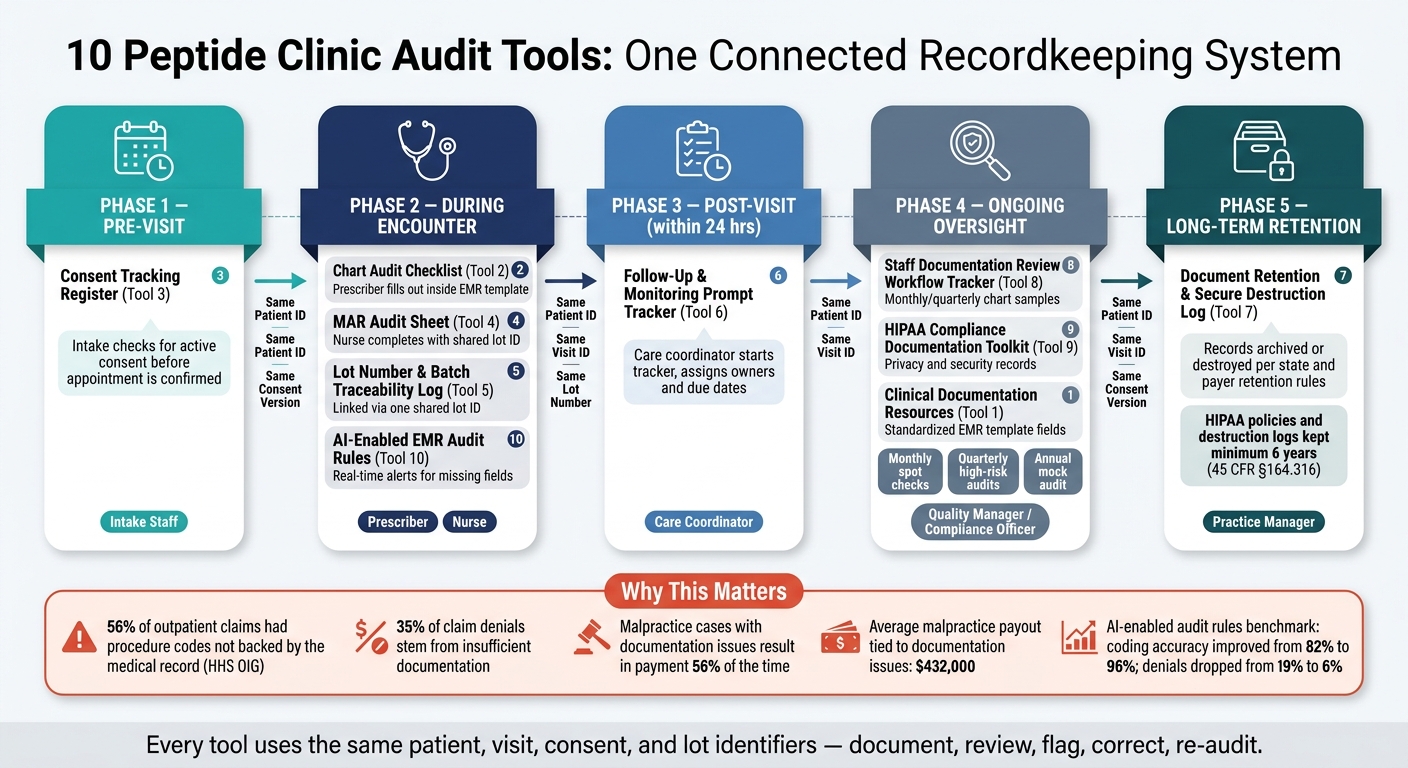
10 Peptide Clinic Audit Tools: Connected Recordkeeping Workflow
Ten separate tools don't turn into a system just because they exist. They become a system when they follow the patient from scheduling all the way to long-term storage, with a clear owner and a clear trigger at each step.
The best way to set that up is with one written documentation pathway: a clinic SOP that ties each tool to a phase of the visit, names the role in charge, and sets a timing standard. Every tool should use the same patient, visit, consent, and lot identifiers. If those IDs don't match, the whole process gets messy fast.
The pathway has five phases:
- Pre-visit: intake checks for active consent in the Consent Tracking Register before the appointment is confirmed.
- During the encounter: the prescriber fills out the Chart Audit Checklist inside the EMR template. The nurse completes the MAR and Lot Log using one shared lot ID so recall searches stay immediate.
- Post-visit: the care coordinator starts the Follow-Up Tracker within 24 hours and assigns owners and due dates.
- Ongoing oversight: the quality manager reviews a sample of charts each month or quarter with the Staff Documentation Review Workflow Tracker.
- Long-term: the practice manager updates the Retention and Destruction Log when records are archived or destroyed, based on state and payer retention rules.
Written standards make handoffs cleaner. For each tool, the SOP should answer three direct questions: Who owns it? What triggers it? How are gaps escalated? That sounds simple, but it's where a lot of clinics either stay organized or drift into patchwork processes.
For example, if a lot number is missing at the time of administration, that should trigger immediate reconciliation with pharmacy records and a brief incident note reviewed by the medical director. If consent is missing or expired, that should be a hard stop. No administration moves forward until the prescriber gets and documents current consent. Structured fields make this trackable as it happens, not days later when someone is digging through notes.
Tool 10 turns those structured fields into real-time alerts that feed the workflow tracker. When the Chart Audit Checklist, MAR, and Consent Register are built as structured EMR fields instead of free-text notes, automated rules can scan encounters in real time and flag omissions like missing consent references or absent lot numbers. Those flags then feed straight into the Staff Documentation Review Workflow Tracker as open deficiencies, and the medical director assigns and closes them on a set schedule.
That loop - document, review, flag, correct, re-audit - keeps the system lined up between formal reviews. Clinics can use PeptidePrescriber protocol templates, consent exemplars, and regulatory landscape for compounded peptides to standardize the structured fields before the final records review.
Conclusion
No single form protects a peptide clinic. What does the job is one connected record that follows the patient from intake through retention, with each tool passing clean information to the next.
That setup matters because small charting misses can turn into denied claims or legal trouble fast. 35% of claim denials stem from insufficient documentation, and CRICO data show that malpractice cases touched by documentation problems close with an indemnity payment 56% of the time, with average payments of $432,000.
Traceable, on-time records can cut denials, reduce liability, and support safer care. Standard templates make that kind of consistency easier to keep. PeptidePrescriber can help standardize the monographs, protocols, tools, and regulatory references behind those records. Use the right tools, keep the record connected, and make every chart audit-ready.
FAQs
Which audit tools should a small peptide clinic implement first?
Start with a standardized informed consent packet and a matching charting framework. In plain English, that means using one base consent form, then adding medication-specific addenda when needed, such as for GLP-1 treatments or compounded medications.
That setup does two jobs at once. It gives patients a clear record of what they agreed to, and it gives your team a steady way to document care without reinventing the wheel each time.
Your charting should follow the same pattern. Use one consistent note template that records:
- The therapeutic rationale
- The consent version used
- The follow-up plan
That kind of consistency matters. If someone reviews the chart later, the story is easy to follow.
It also helps to put a one-page audit checklist in place from day one. Keep it focused on core compliance checkpoints, including:
- Vendor verification
- Staff training logs
This creates a repeatable audit trail from the start, which makes day-to-day oversight much easier and cuts down on gaps that tend to show up when records live in too many places.
How do these tools fit inside one EMR workflow?
Standardize the workflow by linking consent, charting, and monitoring into one consistent record. Start with a base consent template, then add addenda for compounding or off-label use. In the chart note, cite the exact consent version and date. That small step can save a lot of back-and-forth later.
Then connect EHR flowsheets with symptom logs and baseline labs so you can track endpoints in one place. The goal is simple: a clear audit trail for whether therapy should continue, change, or stop at each fixed interval.
When should a patient be re-consented for peptide therapy?
Re-consent patients any time therapy changes in a meaningful way. That includes changes to the indication, peptide, source pharmacy, or overall risk level.
You should also refresh consent when:
- starting a new peptide
- switching from branded to compounded
- beginning GLP-1 therapy and reviewing titration counseling
- using compounded or off-label therapy that calls for documented patient understanding, not just a signed form
The key point is simple: a signature alone isn't enough. The chart should show that the patient understood what changed, what it means for their care, and any added risk tied to the new therapy.