If I run or work in a peptide clinic, I should treat MedWatch as my main FDA reporting path for serious reactions, product defects, and harmful medication errors. I do not need proof that the peptide caused the problem. If there is a reasonable link, I can report it.
Here’s the article in plain English:
- What to report: serious adverse events, unusual non-serious reactions, product quality problems, and some medication errors
- What to collect: patient details, product details, lot number, timeline, outcome, and clinic contact info
- How to file: clinics use Form FDA 3500; patients use Form FDA 3500B
- How to send it: online first, or by fax, mail, or phone for urgent cases
- When to send it: many clinics use 24–72 hours for serious events and 7–14 days for other reportable cases
- What happens next: keep the case open, answer FDA or pharmacy follow-up questions, and log the case in the clinic quality file
One key point stands out: MedWatch is about both patient harm and product problems. So I need to know the difference between an adverse event and a product quality complaint, and sometimes report both in the same case.
A few examples the article points to:
- Adverse event: anaphylaxis, severe hypoglycemia, ER visit, hospitalization
- Product quality complaint: particulates in a vial, wrong concentration, bad label, warm shipment
- Use error: wrong diluent, 1.0 mL drawn up instead of 0.1 mL, wrong route of administration (see our guide on proper injection technique)
The article also stresses clean documentation. I should build a short timeline in order:
baseline → dose → symptom start → treatment → outcome
And I should attach only the records that support the case, like:
- progress notes
- lab results
- imaging
- vial or label photos
- shipping or temperature logs
- pharmacy messages
Here’s the shortest way I’d put it:
| Topic | What I need to know |
|---|---|
| Main purpose | Report suspected safety issues tied to peptide products |
| Clinic form | FDA Form 3500 |
| Patient form | FDA Form 3500B |
| Top filing method | Online |
| Serious case timing | Often 24–72 hours by clinic policy |
| Core rule | Report even if causation is not proven |
If I want a simple internal workflow, it’s this: spot the event, document it, submit it, then track follow-up. That is the full point of the article.
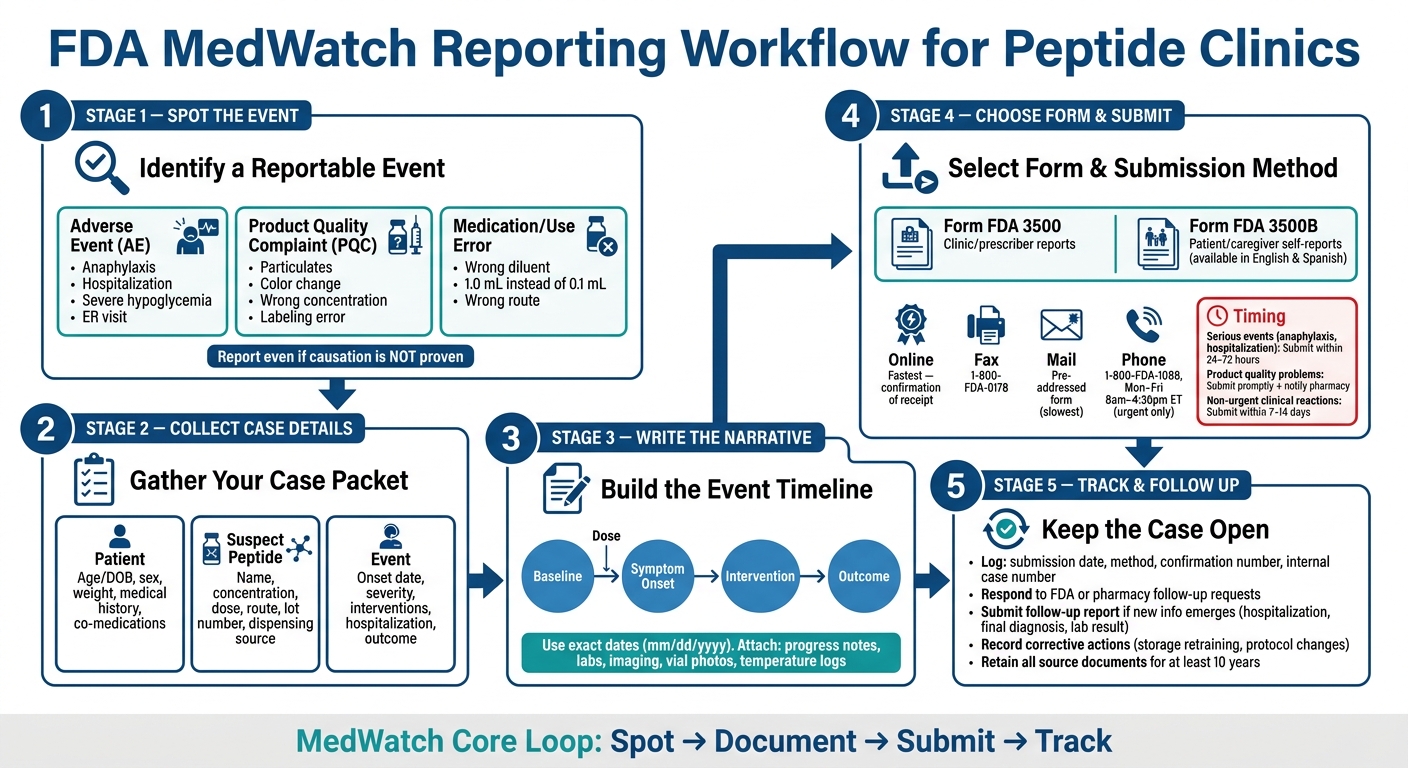
FDA MedWatch Reporting Workflow for Peptide Clinics
MedWatch Tips & Tools (January 2016)
sbb-itb-7164bd9
What to report: Identifying reportable events in peptide practice
Use the criteria below to figure out what belongs in MedWatch. FDA says to report problems even if you are not sure the product caused the event. So if something happened during use, or soon after, it’s worth screening. From there, sort it into one of three buckets: an adverse event, a product quality complaint, or both.
Serious and clinically important adverse events
Any event that meets FDA’s seriousness standard should be sent to MedWatch without delay. That includes death, life-threatening reactions, initial or prolonged hospitalization, persistent disability or permanent damage, and congenital anomalies that are temporally linked to peptide therapy.
In peptide practice, that can mean things like anaphylaxis, severe hypoglycemia, or a serious injection-site infection that sends the patient to the ER.
Not every reportable event has to be “serious” in the strict FDA sense. Non-serious events can still matter if they’re unexpected, unusually severe, show up in clusters, or point to a new risk pattern. A few examples:
- Mood changes or agitation after a neuropeptide
- Blood pressure swings from a peptide not expected to affect blood pressure
- Repeated injection-site reactions tied to a specific lot
This matters even more with newer and compounded products, where single-case reports can be the first sign that something is off.
Product quality complaints and medication errors
Product quality complaints focus on the product itself, not the patient outcome.
Report to MedWatch if a peptide vial has visible particulate matter, unexpected cloudiness, a color change, or any other sign that it may not meet expectations for identity, strength, purity, sterility, or potency. Suspected incorrect concentration also belongs here. If a patient has an unexpected overresponse, or almost no effect at all, that may point to a potency issue.
Labeling problems should also be documented. That includes the wrong peptide name, mismatched lot numbers, or missing reconstitution instructions. Storage temperature excursions count too, such as a refrigerated peptide that arrives warm or is stored above its labeled range.
Medication and product use errors also deserve attention. In peptide settings, common examples include reconstitution mistakes, like using the wrong diluent or mixing up milliliters and units; dose errors, such as drawing 1.0 mL instead of 0.1 mL; and route errors, like giving a peptide intramuscularly when it was meant for subcutaneous use.
Near misses should be reported internally. MedWatch comes into play when the error causes harm or shows a serious risk.
Adverse event versus product quality complaint: knowing the difference
A simple way to think about it: AE asks what happened to the patient. PQC asks what may be wrong with the product.
| Feature | Adverse Event (AE) | Product Quality Complaint (PQC) |
|---|---|---|
| Primary subject | The patient | The product |
| Core question | What happened to the patient? | Does the product meet identity, strength, purity, sterility, and potency expectations? |
| Key documentation | Symptoms, timeline, clinical course, outcome | Lot number, pharmacy source, storage conditions, physical appearance, and any testing performed |
| Peptide examples | Anaphylaxis, hospitalization, persistent neuropathy | Particulate matter, color change, incorrect concentration, labeling error |
Some cases need both AE and PQC details in the same report. In those situations, file one report with both sets of details, or cross-reference separate reports if that’s required.
Once you know which type of event you’re dealing with, the next step is gathering the case details needed for a complete MedWatch report.
How to prepare a complete MedWatch report
Before you open the form, pull everything into one case packet. A complete MedWatch report needs four parts: an identifiable patient, reporter, suspect product, and event.
Collect the required case details
Start with the patient details: age or date of birth, sex, medical history that matters here, and any co-administered therapies that could affect causality. Common examples include GLP-1 agents, insulin, and thyroid medications.
Then document the suspect peptide with precision. Include the exact product name, the salt form when that matters, concentration, dose, route, frequency, start and stop dates, and the lot or batch number if you have it. If the product came from a 503A or 503B pharmacy, copy the source exactly as it appears on the label or invoice so someone can follow up later without guesswork.
Last, record the outcome in plain terms: Did the patient go to the ER? Were they hospitalized? Did they recover, still have symptoms, or die?
| Report element | What to capture |
|---|---|
| Patient | Age/DOB, sex, weight, relevant history, co-administered medications |
| Suspect peptide | Name, salt form, concentration, dose, route, frequency, start/stop dates, lot number, dispensing source |
| Event | Description, onset date, severity, interventions, hospitalization status, outcome |
| Reporter | Prescriber name and clinic contact information |
Once you have those pieces, turn them into a short timeline.
Write the event narrative and timeline
Keep the narrative short and in order. A simple baseline → dose → onset → intervention → outcome flow is much easier for FDA reviewers to read than a loose problem list with no timing. Use exact dates for each step instead of relative phrases like “a few days later.”
Internal clinic records are often kept in mm/dd/yyyy format, but the FDA MedWatch form may show dates in dd-mmm-yyyy style. Check every date before you move it into the form so nothing gets misread.
Be sure to note whether symptoms improved after the peptide was stopped, whether they came back after it was restarted, and whether any other medications changed around the same time. Those details can help reviewers judge whether the peptide likely caused the event.
Then attach only the records that back up the timeline and the product review.
Supporting documents to attach with your report
Attach progress notes, key labs, and imaging. If this is a product quality complaint, include photos of the vial, label, and packaging. For cold-chain issues, add temperature logs and shipping records. For medication errors, include the original order, the dispensing record, any internal incident report, and any pharmacy or compounder communications that matter.
Redact extra identifiers before you submit the packet. That includes full names, Social Security numbers, and complete addresses. At the same time, leave enough detail to meet the "identifiable patient" standard.
A good way to handle this is simple: keep the full source file in your clinic system, then submit a redacted MedWatch packet. If FDA or the pharmacy asks for clarification later, your complete record is already in one place and easy to pull.
With the case packet complete, choose the correct MedWatch form and submission method.
How to submit your MedWatch report
Form FDA 3500 versus Form FDA 3500B: which to use
Once the case packet is ready, pick the right form. Use Form FDA 3500 for clinic-filed reports and Form FDA 3500B for patient or caregiver self-reports.
Your clinic should submit Form FDA 3500. Patients who want to file on their own can use Form FDA 3500B. Form 3500 works for clinic reporting because it includes the event narrative, patient details, suspect product information, and outcome. In Section D, enter the product name, strength, dose, route, lot number, and treatment dates.
Form FDA 3500B is the plain-language version for patients and caregivers, and it is available in English and Spanish. It is meant for independent patient or caregiver reports, not clinic-started reports. A simple setup is this: your clinic uses Form 3500 for its own submissions, and patients who want to self-report are directed to Form 3500B.
Online, fax, mail, and phone submission options
After you choose the form, send it using the fastest route you have. Online submission should be your first choice because it is the fastest option and gives you confirmation that the FDA received the report. The online portal also lets you return to a started report within 3 days, which helps when you're still waiting on a lab result or checking a lot number.
Use the method that fits the case urgency and your clinic workflow.
| Method | Best use | Key note |
|---|---|---|
| Online | Standard clinical reporting | Fastest option; confirmation of receipt |
| Fax | Backup when online access is limited | Fax to 1-800-FDA-0178; fax the completed form and continuation pages |
| Non-urgent or historical reports | Mail the pre-addressed form to the FDA address listed on it; slowest option | |
| Phone | Urgent initial notification for severe events | Call 1-800-FDA-1088, Monday-Friday, 8:00 a.m.-4:30 p.m. ET; a written report may still be needed |
Your written clinic policy should name all four options, keep the contact details up to date, and state who is responsible for submitting reports. That might be the medical director, the prescribing clinician, or a safety officer.
When to submit: internal clinic timing guidelines
Set in-house filing deadlines based on how serious the event is. Clinic-filed MedWatch reports do not have a fixed statutory deadline. Still, you need clear timing rules so cases don't sit in limbo.
- Serious events such as anaphylaxis, hospitalization, or major disability: submit within 24-72 hours of recognition.
- Product quality problems such as visible particulates, suspected contamination, or labeling errors: submit promptly and notify the supplying pharmacy at the same time.
- Non-urgent but clinically important reactions: a 7-14 day window is usually enough to finish the narrative and attach records.
Any event that meets serious criteria should go to the clinical lead for same-day review. After filing, document the report number and get ready in case follow-up is needed.
After submission: follow-up steps for your clinic
How to handle FDA or pharmacy follow-up requests
After you file, keep the case open for FDA or pharmacy follow-up. In plain terms, don't treat submission as the finish line. Keep the case marked open until every follow-up item is closed. An FDA reviewer may reach out to your clinic for clarifying details, including updated outcomes, added chart notes, lot number confirmation, or lab results. Record the confirmation number in the internal case file, assign one point of contact, and keep an internal follow-up tracker active until the case is resolved.
When requests come in, use the submitted case packet as your source of truth. That helps your team stay consistent and cuts down on mix-ups. Send the exact records FDA or the pharmacy asks for, such as labels, packaging, lab results, or product identifiers. If product quality is in question, pull the lot-specific COA to confirm identity, purity, and endotoxin results.
Sometimes the missing piece just isn't there. If that happens, document the steps you took to find the information and note why it wasn't available.
If new clinical information comes up after the first report was filed - like a hospitalization, a final diagnosis, or a lab result - submit a follow-up report that references the same suspect product and includes a short summary of the original event so FDA can connect it to the earlier case. Add that update to the patient chart and the internal case file too.
Recording the event in your clinic quality system
Every submitted MedWatch case should also live in your internal quality system. At minimum, log:
- Submission date
- Method used
- Confirmation number
- Internal case number
- Any follow-up communication with FDA or the pharmacy
Keep all source documents - chart notes, COAs, packaging images, and correspondence - for at least 10 years.
Just as important, record what changed after the event. Note any corrective actions tied to the case, such as storage retraining, label review, or protocol changes. If the event points to a pattern instead of a one-off reaction, use it to trigger a broader process review.
Conclusion: The core MedWatch workflow for peptide clinics
MedWatch works best as a closed loop: report, follow up, document updates, and record corrective action.
FAQs
Do I report if I’m not sure the peptide caused it?
Yes. Report adverse events even if you’re not sure the peptide caused the issue.
The FDA MedWatch program is meant to track possible safety signals, so you do not need proof that the peptide caused the event before you file a report. If you’re unsure, document what happened and submit the report to support patient safety and meet regulatory requirements.
When should my clinic file a MedWatch report?
File an FDA MedWatch report if a patient has a serious adverse event tied to an FDA-approved peptide.
Compounded peptides are different because they are not FDA-approved. That changes the reporting path. In those cases, keep detailed internal records of patient outcomes and adverse events. In the patient chart, clearly note the clinical reason for use, the exact compounded medication, and any side effects the patient reports or you observe.
What records should I gather before submitting?
Gather the patient’s clinical record. That should include why the peptide was chosen, the patient’s informed consent, and any baseline lab results.
You’ll also want the source pharmacy records and product details in the chart, such as:
- Medication name
- Lot number
- Beyond-use date
- COA
- The patient’s clinical response
- Any adverse event details
- Your monitoring and follow-up log
Keep the records clear and contemporaneous. In plain English: document things as they happen, not days later when details start to blur.