
If your peptide clinic site sends visitor data to Meta, Google, chat tools, or schedulers, that data may be PHI. And if that happens without the right HIPAA setup, penalties can start at $145 per violation and reach $2,190,294 per year for identical violations.
If I had to boil the article down to the main point, it would be this:
- I need to list every tracker, tag, pixel, and embed on the site
- I need to check which pages and events send health-linked data
- I need to flag pages like consult forms, booking flows, and peptide treatment pages as high risk
- I need to verify vendor contract coverage for the exact tool and use case
- I need to block, change, or remove tools that send PHI where they should not
- I need to save proof of reviews, tests, and fixes for at least 6 years
The article’s core message is simple: a cookie banner is not enough, and “general analytics” can turn into a HIPAA issue fast when page URLs, IP addresses, form fields, or event names point to treatment interest. A visit to a page about semaglutide, BPC-157, or a consult request can be enough to create risk when third-party tools fire.
What matters most is the workflow:
- Inventory every tool by page
- Classify what data each one sends
- Verify BAA coverage, settings, and data controls
- Document every fix, test, and approval
A few pages need the closest review: intake forms, scheduling pages, patient portal entry points, consult requests, and condition-specific peptide landing pages. Those pages often connect identity data with health-related intent.
In plain English: if a tracker can tie a person’s IP address, device ID, URL, or form activity to interest in a peptide service, I should treat that setup as a HIPAA review item right away.
The rest of the article walks through that review process step by step.
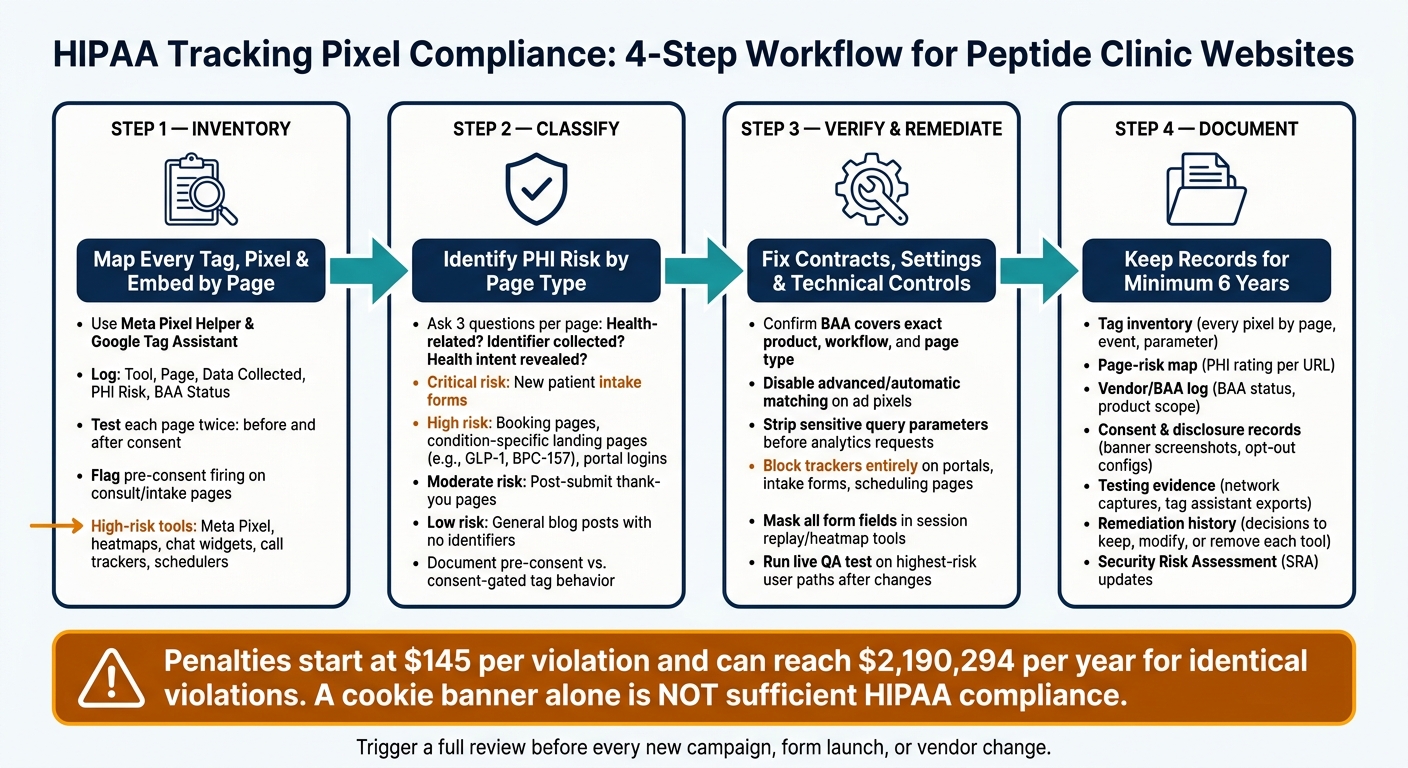
HIPAA Tracking Pixel Compliance Workflow for Peptide Clinic Websites
HIPAA-Compliant Patient Communication: Common Mistakes Practices Make | LeadSquared in Healthcare
sbb-itb-7164bd9
Step 1: Build a page-by-page inventory of every tag, pixel, and embedded tool
This step takes the PHI warning and turns it into a page-level tag audit. The goal is simple: map every tag, pixel, and embed by page, then trace what data each one sends.
Start by crawling the site and grouping URLs by page type. Then review each group in browser developer tools. Open pages one by one, and use Meta Pixel Helper and Google Tag Assistant to spot every script, pixel, and embed. As you go, log each item in your internal tracking table:
| Tool/Vendor | Page | Data Collected | PHI Risk | BAA Status | Required Action |
|---|---|---|---|---|---|
| Meta Pixel | Consult Request | URL, event params, IP address | High-risk | Not confirmed | Suspend |
| GA4 | Peptide Education | Page views, URLs, query strings | Low | Not confirmed | Verify consent mode |
| Heatmap Tool | Intake Form | Keystrokes, form content | High-risk | Not confirmed | Disable or mask inputs |
| Chat Widget | All Pages | Transcripts, contact info | High-risk | Not confirmed | Restrict |
| Call Tracker | Consultation CTA Page | Caller ID, recordings | High-risk | Not confirmed | Review recording settings |
| Appointment Scheduler | Booking Page | Name, email, health goals | High-risk | Not confirmed | Verify BAA; restrict analytics |
Also log the consent state for each page so Step 2 can sort out which tags may stay live. Test every page twice:
- once with no cookies accepted
- once after consent is granted
Note which tools fire on page load and which ones wait for consent. If something fires before consent on consult or intake pages, that’s a high-risk finding.
Audit Meta Pixel and Google tags by event, page, and parameter
For each Meta Pixel instance, record the Pixel ID, the events in use - such as PageView, Lead, CompleteRegistration, or custom events like "ConsultRequest" - and the parameters sent with each event. Pay close attention to URLs, query strings, and any form-related values.
For Google tags, document the GA4 property ID, the Tag Manager container ID, any active Google Ads conversion IDs, and the consent mode settings tied to each tag. Google’s consent mode splits consent into separate types - analytics_storage, ad_storage, ad_user_data, and ad_personalization - so each one needs its own check. Also review whether enhanced measurement or granular location and device data collection is turned on in GA4, and whether IP addresses are truncated server-side.
Audit heatmaps, chat widgets, call tracking, and form tools
Heatmap and session replay tools need a closer look. Check whether the tool records only aggregate click maps and scroll depth, or whether it captures full session replays with mouse movements, keystrokes, and form content. A masked replay can look safe on the screen while the raw event stream still holds unmasked values. If a page lets users enter health history, medications, or peptide therapy goals, confirm that field masking is on by default - not just sitting there as an option.
Chat widgets can be just as risky. On consult-focused pages, transcripts may include health complaints, peptide-related questions, and contact details. Put together, that can become PHI when tied to a covered entity.
Call tracking deserves the same level of care. Tools that use dynamic number insertion connect phone calls back to web sessions, campaigns, and landing pages. If those calls are recorded and the person is asking about a peptide protocol, the recording likely contains PHI.
Embedded forms and schedulers should be checked field by field. Then trace whether any of those values make their way into analytics or ad platforms. If a form collects both personal identifiers and health-related details on a public-facing page, treat it as high-risk and flag it in the Required Action column.
Use this inventory to separate low-risk tags from PHI-exposing tags in Step 2.
Step 2: Classify what data may pass and where the highest PHI risk sits
Once you finish your inventory, move to classification.
The goal here is simple: figure out what each tracker sends and where your biggest PHI risk lives. Look at each tag and note whether it sends URLs, event parameters, form values, IP addresses, device IDs, or cookies. Then ask whether that data can identify a person or point to health-related intent. Use your Step 1 inventory to give each page a risk tier before you decide which tags can stay active.
If both conditions are met, treat the data as PHI under HIPAA. OCR has said that individually identifiable health information collected via tracking technologies on a regulated entity's website is generally treated as PHI, including data collected before a form submission or appointment booking.
PHI classification checklist for high-risk pages
For each page in your inventory, work through these three questions in order:
- Is this page related to health care services? A page titled "Semaglutide Weight Loss Program" or "Peptide Therapy for Joint Pain" clearly counts. The same goes for a new patient intake form, follow-up peptide consult scheduling, or a portal login screen.
- Does any tracker collect an individual identifier? That includes obvious fields like name, email, and phone number. It also includes IP address, device ID, cookies, and any other code that can be tied back to a person.
-
Does the page content, URL, event, or form field reveal health-related intent? Examples include
/peptides/weight-loss?plan=semaglutide,peptide_protocol_selected = "testosterone optimization", or an erectile dysfunction field.
The table below maps common page types to risk level based on those three questions:
| Page Type | PHI Risk | Key Risk Factors |
|---|---|---|
| New patient intake form | Critical | Combines PII, medical history, and treatment interest |
| Telehealth booking / scheduling | High | Links identity to appointment type and health intent |
| Condition-specific landing page (e.g., GLP-1 weight loss) | High | IP address tied to specific treatment interest |
| Peptide protocol selection page | High | User choices (e.g., "Start BPC-157") tracked with ad IDs |
| Patient portal login or account creation | High | Usernames or patient IDs captured by third-party scripts |
| Post-submit thank-you page | Moderate | Confirms conversion for a specific health service |
| General blog post (no identifiers, no health-specific events) | Low | Aggregated traffic data with no identifiable link |
Document pre-consent firing, consent-gated tags, and nonessential tracking
After you classify each page, document when each tag fires. This part matters a lot.
Pre-consent firing means a tracker loads and sends data as soon as a user lands on the page, before they accept any cookie banner. Consent-gated tags fire only after the user opts in. For example, if a Meta Pixel fires on page load on a peptide consult landing page, it sends the user's IP address and ad identifiers to Meta before any agreement is given. That's a high-risk setup.
Cookie consent does not authorize PHI disclosure; only proper HIPAA controls and vendor coverage do.
Use the table below to compare tag behavior across your site:
| Tag Behavior | Risk Level | What to Document |
|---|---|---|
| Pre-consent firing on health-related page | High | Tag name, page URL, data sent, whether a BAA exists |
| Consent-gated tag on health-related page | Review required | Consent category, data sent post-consent, BAA status |
| Nonessential tracking (remarketing, behavioral analytics) | High if on clinical pages | Purpose, data collected, page location, vendor BAA status |
| Anonymous/aggregated analytics (no identifiers, no health events) | Low | De-identification method, IP truncation setting, no ad IDs |
For remarketing pixels, advanced heatmaps, and funnel analytics on intake or scheduling pages, document the business purpose and data risk, the data collected, the page location, and the vendor's BAA status. In plain English: write down what the tag does, where it runs, and what could go wrong if it stays there.
Flag every high-risk row for contract and control review in Step 3. These classifications become the evidence base for Step 3.
Step 3: Verify vendor contracts, technical controls, and remediation actions
Your Step 2 risk tiers should now guide the fix. Put simply: use that tier to decide what can stay live, what needs new settings, and what has to come off the site.
Check BAA status and product-specific contract coverage
Don’t rely on a vendor’s marketing copy. You need to verify the BAA for the exact product and workflow in use.
That means checking whether the BAA covers the exact product, workflow, and page type. If it does not cover the tool and workflow you use, treat that tool as unsuitable for any page where PHI could be exposed. After Step 2, that includes intake forms, scheduling flows, condition-specific landing pages, and patient portal screens.
Apply technical safeguards before any tracker stays live
Legal coverage matters, but it doesn’t solve the whole problem. Even when a tool is covered by a BAA, you still need to set it up so it doesn’t collect too much data.
Before any tracker stays live on a peptide clinic page, work through these controls:
- Disable advanced or automatic matching on ad pixels.
- Strip sensitive query parameters before any analytics or ad request leaves the site.
- Block trackers entirely on high-risk pages - portals, intake forms, scheduling pages, and other explicit health-intent pages. In some cases, changing settings won’t cut it; removal is the safer move.
- Mask all form fields in session replay and heatmap tools. Free-text fields that ask about symptoms, medications, or treatment goals must be suppressed before any replay data leaves your environment, and field masking should be enabled by default.
If you use server-side tagging, remove or pseudonymize identifiers inside clinic-controlled infrastructure before forwarding data to any third party.
Create a remediation log with supporting evidence
Document each remediation decision and keep that record for six years from the date of creation or effective date.
A solid remediation log entry should include the date of review, the tool name and vendor, the specific pages affected, the risk category from Step 2, the PHI impact, the decision made (keep, reconfigure, or remove), and the name or role of the reviewer who approved it. Attach consent exports, Tag Manager history, BAA status, screenshots, and QA notes.
Once a change goes live, run a live-page QA test that mirrors the highest-risk user paths: browsing a treatment page, submitting an intake form, opening chat, scheduling an appointment, and making a test call.
Then inspect network requests in browser dev tools, vendor dashboards, and any server-side logs. You’re checking that names, email addresses, phone numbers, form values, page titles, and sensitive URL parameters are not being sent where they shouldn’t be. Save the test result with the remediation log, and keep that log ready for the next site-change review.
Conclusion: The minimum documentation package for a tracking compliance program
After inventory, classification, and remediation, pull the work into one record set. Write down every remediation decision, vendor check, and technical fix so you can show what changed, when it changed, and why.
Landing pages and lead forms need the closest attention. They often mix identifiers with treatment interest, which makes the paper trail much more important.
Records to keep on file after every site or campaign change
HIPAA-related records should be kept for at least six years from the date they were created or last went into effect.
| Record | What it captures | Update trigger |
|---|---|---|
| Tag inventory | Every pixel, script, and embedded tool by page, event, and parameter | Any Tag Manager or site change |
| Page-risk map | PHI risk rating (high/medium/low) per URL with rationale | New pages, forms, or campaign flows |
| Vendor/BAA log | BAA status, product scope, and configuration requirements per vendor | New vendor or contract renewal |
| Consent & disclosure records | Privacy notice versions, banner screenshots, and opt-out configurations | Any change to tracking or disclosures |
| Testing evidence | Network captures and tag assistant exports showing what data fires where | Pre- and post-remediation |
| Remediation history | Decisions to keep, modify, or remove each tool, with sign-off | Each identified issue |
| Security Risk Assessment (SRA) updates | Security Risk Assessment revisions tied to material website or campaign changes | Any significant site or marketing change |
Treat this checklist like a living file, not a one-time project. When a new campaign goes live, a form gets added, or a vendor gets swapped out, update the matching rows and save the revised files with a clear date and named owner.
Also keep the supporting proof with the log. That includes screenshots, network traces, and configuration exports tied to each fix.
Use this checklist before every new campaign, form launch, or vendor change.
FAQs
When does website tracking data become PHI?
Under HIPAA, website tracking data becomes PHI when it can identify a lead and tie that person to an interest in medical treatment.
Put simply: if a tracking tool connects a specific person to their health status or to the fact that they’re seeking clinical care, that data counts as PHI.
That’s why clinics should keep patient-level data inside secure clinical systems, such as an EMR, and keep it out of marketing analytics tools.
Which pages on a peptide clinic site are highest risk?
The highest-risk pages are the ones where people use intake forms, booking tools, or any other interface that collects PHI.
Landing pages can be risky too, especially when you track form starts, form completions, or call clicks. Here’s the problem: browser-based tracking pixels can accidentally send PHI to third parties.
A safer approach is to keep pixels off sensitive pages. If you still need tracking, use server-side tracking through a CDP with a signed BAA.
What records should we keep after fixing tracking issues?
Keep a dated audit trail of every fix made to Meta Pixel, Google tags, heatmaps, chat widgets, call trackers, and form tools. That record should also include pre-approval reviews, medical/regulatory claim reviews, disclosure proof, and all approval records.
Before the next launch, log every UTM, pixel, and CRM change. Hold on to briefs, scripts, redlines, and final assets for at least three years.
For analytics, keep data de-identified and aggregate. PHI should stay inside secure clinical systems.